 Pizyn
How this test ran
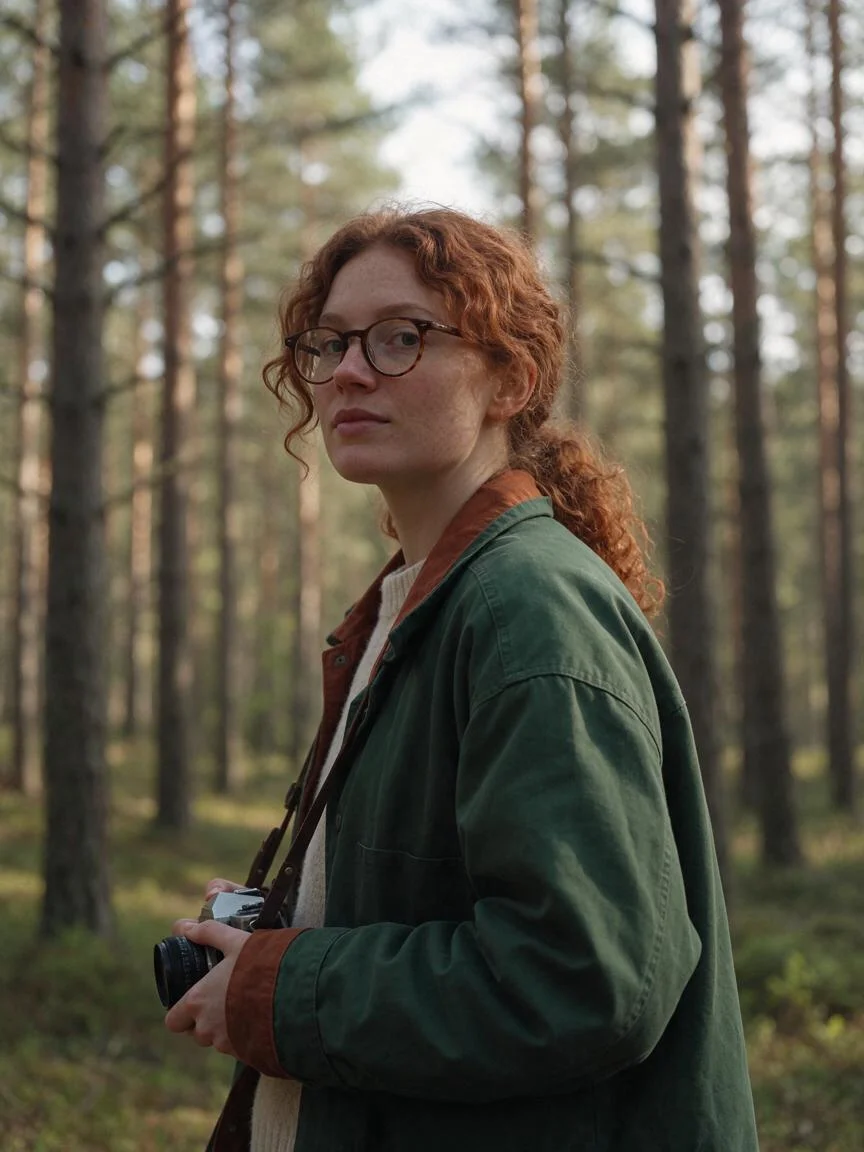
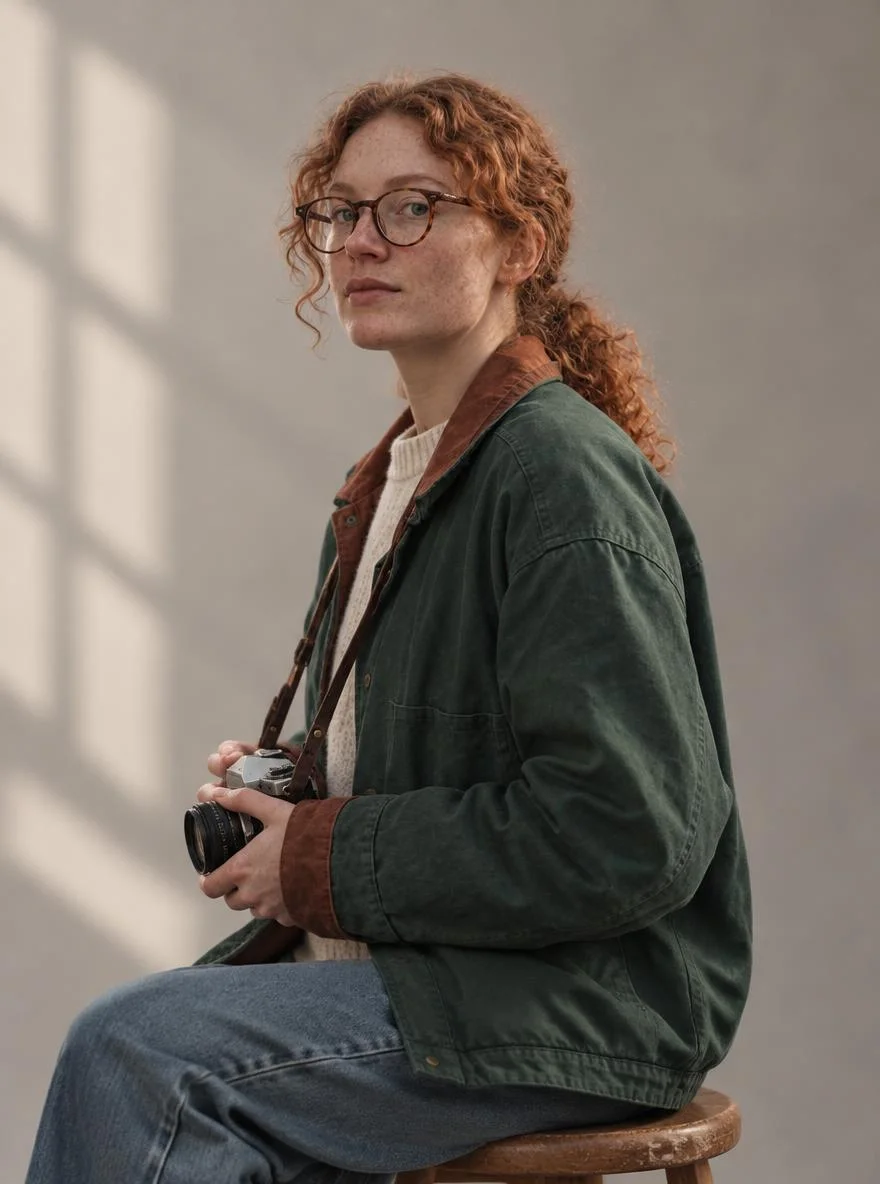
Every frame below was generated on November 13, 2026 through this studio, first outputs kept, prompts quoted verbatim. The cast is one fictional character, Mara, a 32-year-old wildlife photographer. Six generations — two text-to-image and four reference edits — cost $0.19 in provider fees. The base portrait above is Seedream 5.5 at 1K, 4 credits; the four edits each took that portrait as their only reference and moved Mara to a new scene.
The test has two parts. First, the control: can the same words, with no reference photo at all, reproduce the same woman in a new scene? Second, the edits: when four different models are handed the same reference photo, which ones actually keep the face?
Step one: write the character sheet
Consistency starts before any reference image exists, because the first portrait has to come from text alone. The trick is to describe the character the way a casting director would: fixed, checkable traits, repeated word for word in every prompt. Not "a beautiful woman" — that is a different woman every time — but hair, glasses, freckles, jacket, camera. Our sheet, used verbatim in every prompt in this test:
"Mara, a 32-year-old wildlife photographer with curly auburn hair tied back in a low ponytail, round tortoiseshell glasses, freckles across her nose, wearing a forest-green canvas field jacket over a cream knit sweater, holding a vintage film camera with a leather strap around her neck"
Three rules make a sheet like this work. Pick traits a model can see: hair shape and colour, glasses, freckles, a specific jacket — not personality or backstory, which no image model can render. Keep it short enough to repeat: if the sheet is a paragraph, you will paraphrase it next time and the character will drift with your wording. Freeze the wording: copy-paste it, don't retype it. Our prompt guide makes the general point — concrete, repeatable nouns beat adjectives — and a character sheet is that point applied to a person.
The base portrait was the sheet plus a scene, Seedream 5.5 at 1K, 3:4:
"Editorial portrait photograph of Mara, a 32-year-old wildlife photographer with curly auburn hair tied back in a low ponytail, round tortoiseshell glasses, freckles across her nose, wearing a forest-green canvas field jacket over a cream knit sweater, holding a vintage film camera with a leather strap around her neck, standing in a pine forest clearing in soft morning light, photorealistic, shallow depth of field"
It landed first try: curly auburn hair in a low ponytail, round tortoiseshell glasses, freckles, the green jacket over cream knit, the film camera on its strap. That portrait is now the reference photo for everything that follows — save your best first portrait, because it becomes the anchor for the whole series.
The control: no reference, same words
Before spending anything on edits, we asked the obvious question: does the sheet alone reproduce Mara? Same model, same wording, new scene — Kyoto at night, no reference image:
"Editorial photograph of Mara, a 32-year-old wildlife photographer with curly auburn hair tied back in a low ponytail, round tortoiseshell glasses, freckles across her nose, wearing a forest-green canvas field jacket over a cream knit sweater, standing on a rainy neon-lit street in Kyoto at night, holding a vintage film camera with a leather strap, wet pavement reflections, photorealistic"
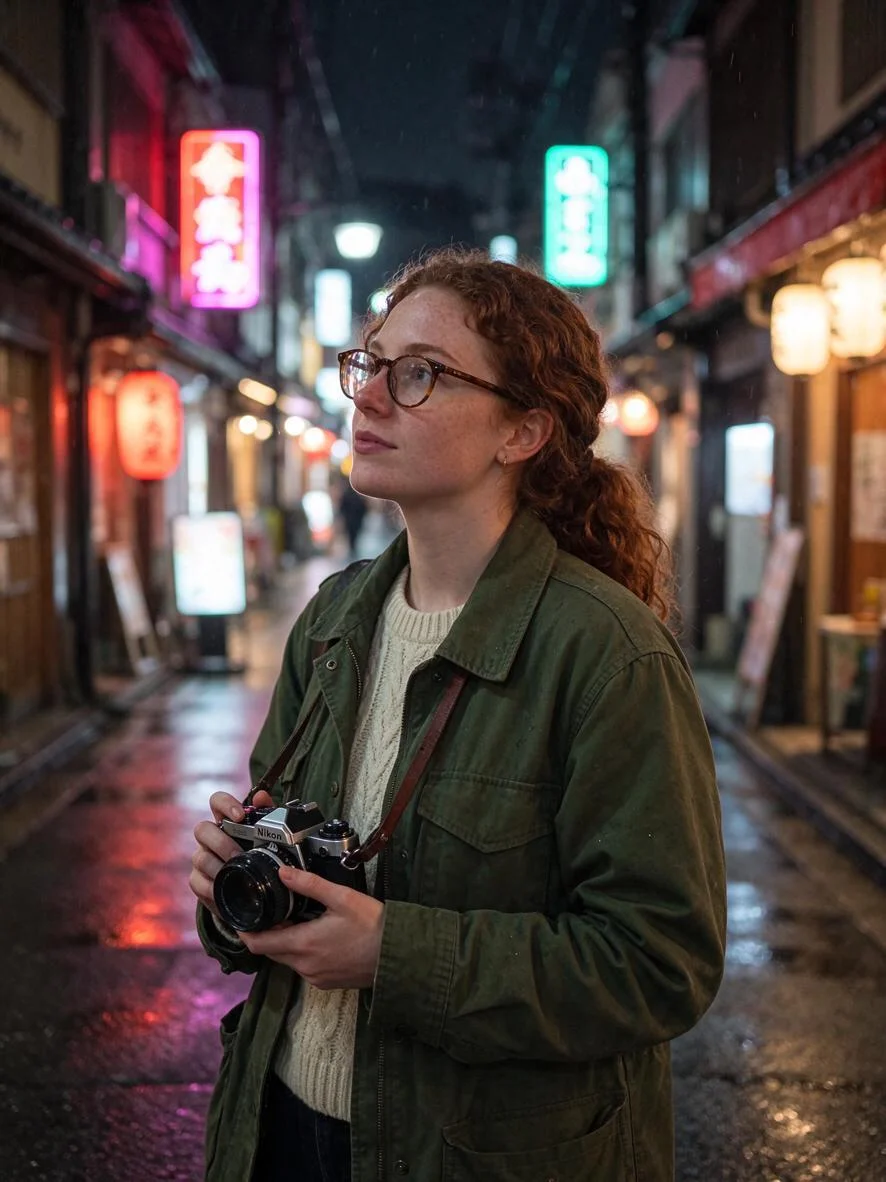
This is the honest result, and it cuts both ways. A detailed sheet does work inside one model: the hair, glasses, freckles, jacket and camera all survived the scene change, and a casual reader would accept this as Mara in Kyoto. But look at the face next to the base portrait and the drift is real — the angle changed, the features softened, the likeness is approximate. Text describes a type; a photo pins a person. That is the whole case for reference editing: the sheet gets you the character, the reference keeps the face.
Four edits, one reference photo
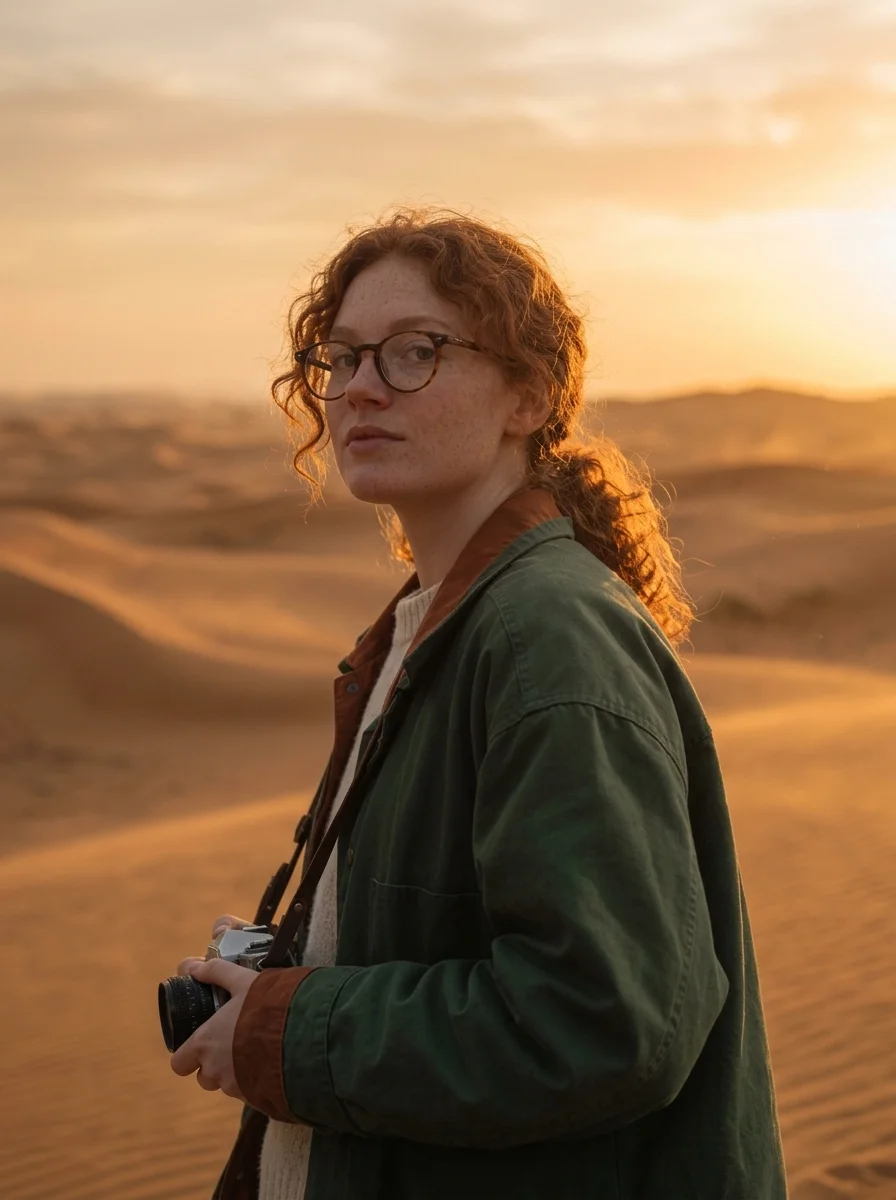
Each edit took the forest portrait as its only reference: keep this exact woman, change the scene. Four models, four scenes, first outputs kept.
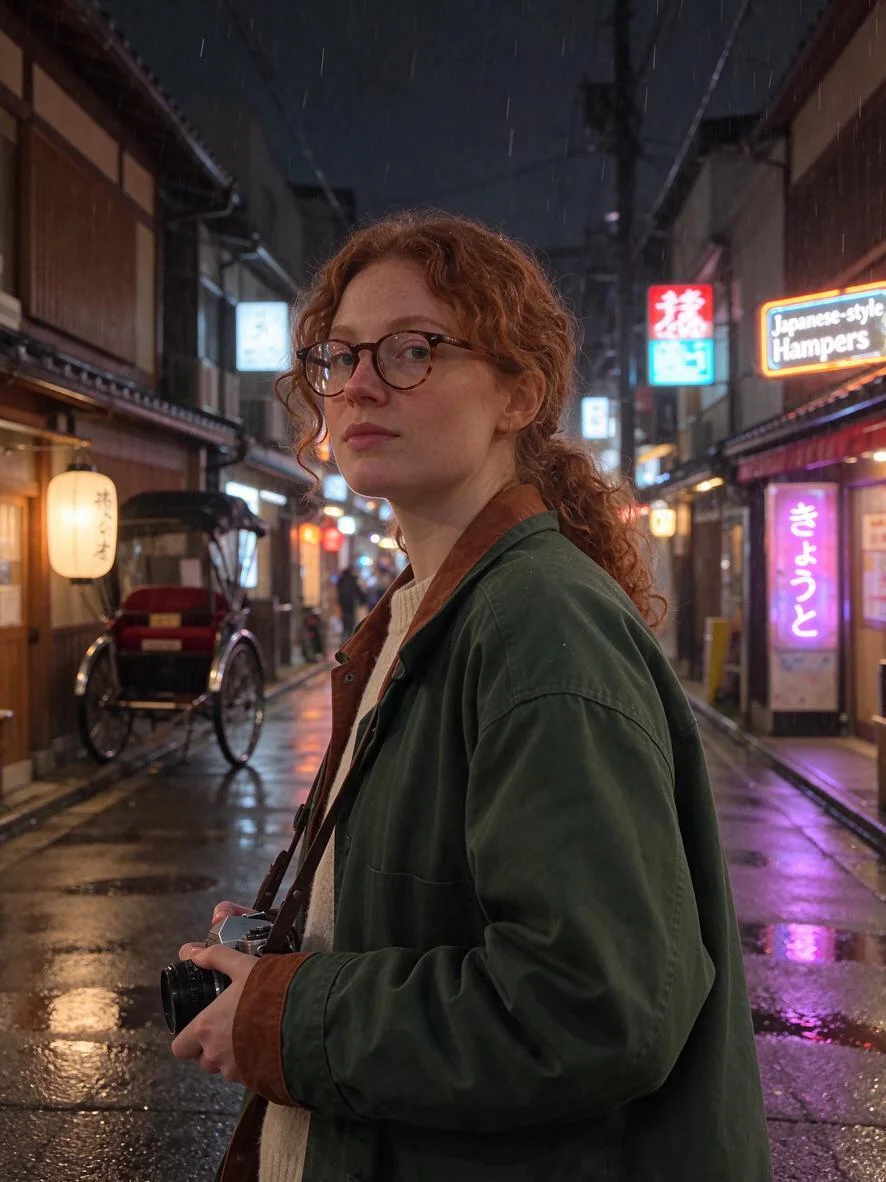
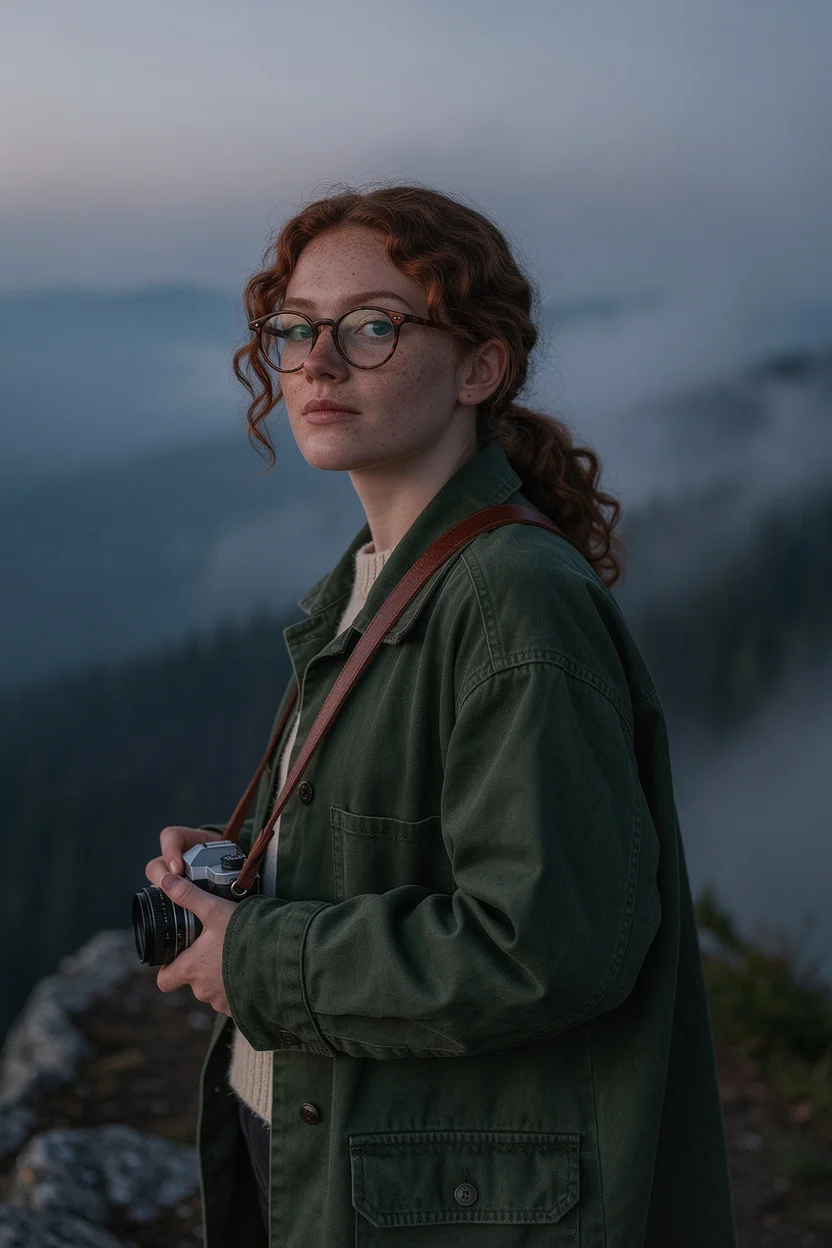
Put the Seedream edit next to the control and the value of the reference is visible in one glance: same scene, same model — the edit is Mara, the control is someone who looks like Mara.
Scores: who kept Mara
Judged on face, hair, glasses and outfit against the base portrait — first outputs, no cherry-picking:
- Seedream 5.5 edit — 5/5. Near-identical: face, ponytail, jacket and camera all survive, and the new scene is fully rendered rather than pasted in. Also the cheapest edit in the test.
- Nano Banana 2.1 edit — 5/5. Near-identical, and the best relighting: the sunset wraps her hair in warm light without changing her features. Its 14-reference ceiling makes it the pick when a scene needs a second reference — an outfit, a prop, a location.
- GPT Image 2.6 edit — 5/5. Near-identical through the hardest brief: new pose, new setting, new light. The 16-reference ceiling is the highest in the studio, and the markup canvas (draw on the image to say where to change) is the extra tool when a plain prompt is not precise enough.
- FLUX 2 Pro edit — 4/5. The face holds; the wardrobe does not. The collar and strap drifted, which matters when the outfit is part of the character. Still a pass for a story series — just re-check the costume in every frame.
- Text only, no reference — 4/5. The control. Works within one model when the sheet is detailed, but the face is approximate and the pose is the model's choice, not yours.
The pattern is consistent with what we found in our Seedream 5.5 review, where edits held a perfume label letter-perfect through a scene swap, and it is the opposite of the MiniMax H3 review, where an edit re-rendered the subject as a close relative instead of preserving her. Not every editor preserves: check the model before you build a series on it.
The workflow: sheet + reference chain
Here is the method, as we would run it for a real series — a comic, a brand mascot, a photo story:
- Write the sheet first, generate the anchor. One tight character description, one portrait. Keep the first output you like — that is your reference photo. Generate it at 1K; you are buying a likeness, not a final.
- Never regenerate the character from text again. Every later frame is an edit of the anchor, not a new text-to-image call. The control above is what happens when you break this rule: a cousin, not a twin.
- Chain edits — but re-anchor. Editing the anchor gives the cleanest likeness. After two or three chained edits the face starts to soften, so every third or fourth frame, edit from the original portrait again.
- Describe the scene, repeat the person. Each edit prompt has two halves: "keep the exact same woman — same face, hair, glasses, jacket" and then the new scene. Drop the first half and the model treats the reference as a mood board.
- Freeze the frame. Same aspect ratio for the whole series (we used 3:4 throughout, except FLUX at 2:3, which is why its frame is a touch narrower). A series that changes ratio every frame looks like four different shoots.
What each edit costs
Three of the four models charge per extra reference image. Prices below are the live studio rates at 1K (FLUX 2 Pro at 1MP), checked against the manifest before writing:
- Seedream 5.5 — 5 credits per edit (4 for the text original), +2 credits per extra reference, up to 10 references. The cheapest edit in this test at $0.02 of provider cost.
- Nano Banana 2.1 — 8 credits per edit (7 for text), +1 credit per extra reference, up to 14 references.
- GPT Image 2.6 — 8 credits per edit at low quality (5 for text), +3 credits per extra reference, up to 16 references, +3 credits if you use the markup canvas.
- FLUX 2 Pro — 10 credits per edit (5 for text), up to 3 references, no per-reference surcharge — the flat edit price is the trade-off for the smallest reference ceiling.
Full pack pricing lives on the pricing page. In pack terms: the whole six-frame test cost 39 credits, under a tenth of the $5 Mini pack, and a ten-frame series — one anchor plus nine Seedream 5.5 edits — costs 49 credits. Consistency is cheap; the expensive mistake is regenerating the character from text every time and throwing away the near-misses.
Where it breaks
Cross-model faces. Every edit above started from a Seedream portrait and stayed faithful — but that is one anchor and four editors. A face generated by one model and edited by another can drift more; if you switch anchor models mid-series, re-check the face frame by frame. Wardrobe drift. FLUX showed it: small costume details (a collar, a strap) are the first things an edit lets go of. If the outfit is the character, name it in every edit prompt. Re-rendering editors. Some models treat a reference as casting direction, not a photo to protect — MiniMax H3's rooftop edit in our review redrew the face outright. Know which kind your editor is before the series depends on it. Multiple people. We tested one person; two characters in one frame doubles the things that can drift, and no model here was asked to keep two faces at once. Text in the scene. Seedream's Kyoto frame spells one sign "Japanese-style Hampers" and renders the rest as plausible-looking Japanese that may or may not be real words — fine for atmosphere, never for a poster that must be read. That job belongs to GPT Image 2.6 or Seedream 5.5 with the copy checked after, per our model guide.
Verdict: the two-line method
Keep the same character in every AI image with two lines: a frozen character sheet, repeated word for word, and a reference photo, attached to every edit. The sheet alone gets you a recognisable character inside one model; the reference is what makes it the same person in every scene and every model. In this test all four editors passed — Seedream 5.5 and Nano Banana 2.1 were near-perfect, GPT Image 2.6 survived the hardest brief, FLUX 2 Pro only let the costume slip. Start with the cheapest edit, Seedream 5.5 at 5 credits, generate your anchor, and build the series from that one frame.